Feel like a geek and get yourself Ema Personal Wiki for Android and Windows
Showing posts with label ASP.NET MVC. Show all posts

13 October 2009

Map a checkbox to an action parameter in ASP.NET MVC

Mapping a checkbox to an action parameter in ASP.NET MVC is not trivial. At least I did not find trivial solution.

To get it working, use the following code:

<input type="checkbox" name="SomeName" id="SomeName"/>
<script type="text/javascript">
  $('#SomeName').click(function() {
    $(this).attr('value', $(this).attr('checked'));
  });
</script>

24 September 2009

Another client wish

For an internal project (C# / NHibernate / ASP.NET MVC / JQuery) there was a request that users could be able to mark parts of the data with colors to indicate parts of the data have changed.

If I had to incorporate this into my domain model, it would be quite complex. I would have to keep track of statuses of every property of every object, and every action should know which status data is relevant to that particular action.

I decided that this would be a simple solution: the coloring will be purely a user-interface feature. There will be a table in the database with the columns "URL", "ElementId", "Color" to store the coloring data. The userinterface will be querying this data after the page has been loaded and store the data using AJAX calls.

I am not 100% sure about this. It is clearly the simplest solution. But the colors are really statusinfo about the data in the application, while the statusinfo will never be associated with the data, only with user interface elements. But I decided in favor of the UI solution taking into account that
- the coloring data is cursory
- the request is purely a visual one
- the ASP.NET MVC application will be the only user of the data

See if I will regret this later.

23 September 2009

Client wishes

In an application I am working on different clients want different views, depending on the context. For example: client A is a sonographer and wants all ultrasound data on top, client B is an obstetrician and wants all obstetric data on top.

I first thought of a per-user preference which is stored in the database. Unfortunately, I did not have a per-user store mechanism yet, so I would have to develop it. Because I am lazy, this triggered a though: this isn't actually a per-user setting, but a per-role setting. There are clients that are both obstetricians and sonographers. They would want the data ordered differently depending on the role they have at that time.

So I decided to solve this in a very simple way, which the user is going to like. I created a button in the view that only switches view properties when clicked. No server-side code involved. It sets a persistent cookie on the client with the last state. The next time the user visits the particular part of the application, the last state is restored.

23 August 2009

Chaining ASP.NET MVC actions

Action Chaining is using the output of action A as input for action B. Applying this pattern to ASP.NET MVC projects is not trivial. This post is meant as a quick start.

Suppose you have the following scenario
  • client places order in browser

  • system redirects client to ~/Order/ThankYou

  • system sends email to client with summary about order

  • system shows summary of order to client
To accomplish this, it would be convenient to reuse ~/Order/Summary for both the email and the browser page


There are other usecases in which Action Chaining would be a valid pattern, for example in cases where you want to show the output of one action as PDF or as HTML depending on the required format. Apache Cocoon is based on this pattern.

The way to execute an action and capture the output in ASP.NET MVC involves some hijacking of the Response Stream and the RouteValues.

The Response Stream can messed with using a ResponseFilter. A response filter is a class that inherits from stream and takes a stream as constructor argument. The stream in the constructor is the original Response stream (or another filter, they can be chained). If you set the filter, the filter stream gets the writes and is supposed to pass the writes to the wrapped stream. Which is exactly what we won't do: we jealously keep the bytes to ourselves in a memorystream:
class BufferingMemoryStreamFilter : MemoryStream
{
public BufferingMemoryStreamFilter(Stream wrappedStream)
{
// ignore the wrapped stream
}
}
Controllers react on the routevalues to find the right action and view. Because we will be executing another action (perhaps on another controller also), the routevalues should be changed for the occasion and restored afterwards.

The method that execute and capture an arbitrary action on an arbitrary controller is posted below.
string GetActionOutput(string controller, string action)
{
// hijack the response stream
var orgResponseFilter = HttpContext.Response.Filter;
var memoryStreamFilter = new BufferingMemoryStreamFilter(
HttpContext.Response.Filter);
HttpContext.Response.Filter = memoryStreamFilter;

// hijack routeData
var routeData = ControllerContext.RequestContext.RouteData;
var orgAction = routeData.Values["action"];
var orgController = routeData.Values["controller"];
routeData.Values["action"] = action;
routeData.Values["controller"] = controller;

var c = ControllerBuilder.Current
.GetControllerFactory()
.CreateController(ControllerContext.RequestContext, controller);
c.Execute(ControllerContext.RequestContext);

HttpContext.Response.Flush();
memoryStreamFilter.Position = 0;
string result;
using (var r = new StreamReader(memoryStreamFilter))
result = r.ReadToEnd();

// restore
HttpContext.Response.Filter = orgResponseFilter;
routeData.Values["action"] = orgAction;
routeData.Values["controller"] = orgController;

return result;
}
Include this in a (base) controller or in a class that has access to the controller to be able to use it.

The code in this post is licensed under the Apache 2.0 license, which in practice means you have permission to use it.

14 August 2009

Peeking into the ASP.NET MVC source with the debugger

Peeking into sourcecode of open source projects can be very useful: you can learn from it, understand the framework you're using better, and find hidden features and maybe you can contribute to the project.

It can be very insightful to be able to step into the code with a debugger. For future reference, this is how to do it for ASP.NET MVC.

Download the source with svn from https://aspnet.svn.codeplex.com/svn/MVC.
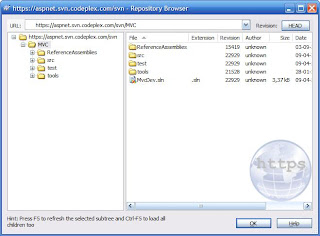

Open the solution MvcDev.sln and check that it builds (just to know for sure).

Add a new ASP.NET MVC website to the solution and set it as startup project (it will be bold)


From the new MvcApplication, remove the reference to System.Web.Mvc


Now add a project reference to the System.Web.Mvc project.


Because the System.Web.Mvc assembly doesn't have a strong key, you have to change the references to the System.Web.Mvc assembly to exclude version info and public key token. In the TWO web.config files (one in the root of the web app, one in the Views folder) remove the Version, Culture and PublicKeyToken information from all references to the System.Web.Mvc entries. For example
<add assembly="System.Web.Mvc, Version=1.0.0.0, Culture=neutral, PublicKeyToken=31BF3856AD364E35" namespace="System.Web.Mvc" tagPrefix="mvc" />

will become
<add assembly="System.Web.Mvc" namespace="System.Web.Mvc" tagPrefix="mvc" />


Now you can set breakpoints, hit F5 and start peeking around.

10 August 2009

IE, ASP.NET MVC, AJAX and browser caching

IE caches AJAX requests and won't reload the resource by default. Other browsers do it differently. I am not sure who's "right" here (this document may have the answer). But this can be very annoying behaviour in AJAX applications.

The solution is to explicitely tell IE not to cache.

On this website kazimanzurrashid posted an ActionFilterAttribute to control browser caching behaviour. I changed it a bit so it is possible to prevent any browser caching.

I now have an attribute on my base controller class:
[BrowserCache(PreventBrowserCaching=true)]

This prevents any caching by default. This can be overriden if required (which I never do).

The attribute looks like this:

using System;
using System.Collections.Generic;
using System.Linq;
using System.Web;
using System.Web.Mvc;

namespace YourNameSpaceHere
public class BrowserCacheAttribute : ActionFilterAttribute
{
///
/// Gets or sets the cache duration in seconds.
/// The default is 10 seconds.
///

/// The cache duration in seconds.
public int Duration
{
get;
set;
}

public bool PreventBrowserCaching
{
get;
set;
}

public BrowserCacheAttribute()
{
Duration = 10;
}

public override void OnActionExecuted(
ActionExecutedContext filterContext)
{
if (Duration < 0) return;

HttpCachePolicyBase cache = filterContext.HttpContext
.Response.Cache;

if (PreventBrowserCaching)
{
cache.SetCacheability(HttpCacheability.NoCache);
Duration = 0;
}
else
{
cache.SetCacheability(HttpCacheability.Public);
}

TimeSpan cacheDuration = TimeSpan.FromSeconds(Duration);
cache.SetExpires(DateTime.Now.Add(cacheDuration));
cache.SetMaxAge(cacheDuration);
cache.AppendCacheExtension("must-revalidate,"
+ "proxy-revalidate");
}
}
}